Once upon a time, we had the Internet. The whole thing. You got an IP address, and with it came unfiltered access to everything else. Do whatever you want. Good times. Simpler times.
Nowadays, if you’re lucky, you get “web access”, and depending on where you are, it comes with a price tag that makes your eyes water. And honestly? For work and daily life I don’t need much. A working SSH session to one well-known server would make me a happy camper.
Normally I connect to a VPN and life is good. But sit on a plane, on a ferry, or in one of those public places with “WiFi” (air quotes fully intended), where you pay for the privilege of magic internet, and the VPN just… doesn’t. Or it does, but only if you buy the special extra “remote work” package, which costs more than a month of internet at home. I’m not making that up. I wish I were.
There are plenty of reasons why networks are built like that, and plenty of clever technology to block whatever traffic somebody upstairs decided you don’t need. Fighting it is tedious. I do this stuff for a living, I know how it works, and I still don’t want to spend my ferry ride playing whack-a-mole with somebody else’s firewall.
The one thing that almost always works is HTTPS. Block that, and nobody can check their email or doomscroll, and the help desk gets torches and pitchforks. So: let’s use HTTPS.
Yes, guy in the back, I see your hand. I know you can tunnel stuff over DNS. Good luck with that in places where even DNS barely works. Ask me how I know. Actually, don’t. Grab yourself a juice box and sit back down.
Enter ttyd
ttyd is not SSH. It’s a small program that shares a terminal over the web: it runs a command in a tty on the remote machine and talks to your browser over WebSockets. Your everyday web browser becomes your terminal program, the WebSocket rides inside HTTPS like any other web traffic, and the firewall goes “eh, looks like a web page” and waves it through.
The remote end can be an exposed jumphost in a protected environment that can reach resources in a protected network (say, over a VPN), or simply a box with basic internet access and all the Unix tools you need to get the job done.
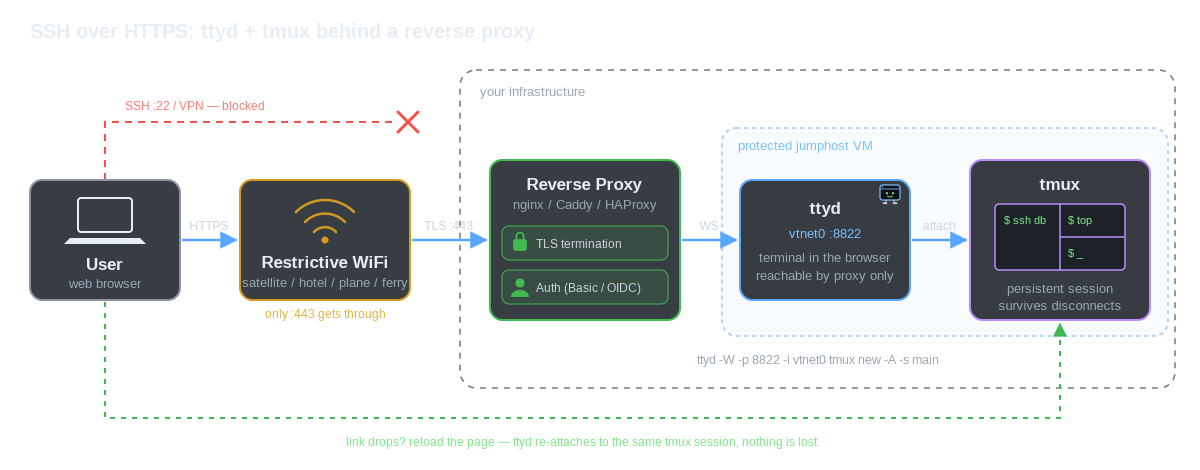
The setup
For security reasons, my ttyd lives on a dedicated VM, behind a reverse proxy. The proxy terminates the incoming TLS connections, handles the certificates and makes sure only the right people get in. If you’re feeling fancy, bring in an identity provider like Authentik. Your environment, your requirements, your responsibility.
On the VM, ttyd runs like this:
ttyd -W -p 8822 -i vtnet0 tmux new -A -s main
-W makes the terminal writable. Recent ttyd versions are read-only by default, which is very safe and also completely useless for actual work. -i vtnet0 binds ttyd to the VM’s network interface, so the reverse proxy can reach it.
And then there’s tmux, the unsung hero of this whole operation. Satellite links drop. They drop a lot, usually right in the middle of something important. Without tmux, a dropped connection takes your shell and everything running in it down with it. With tmux new -A -s main, ttyd attaches to the existing session called “main” (or creates it if there isn’t one yet). When the link comes back, you reload the tab and you’re right where you left off. Nothing lost except a little dignity.
One thing to watch: your reverse proxy has to pass WebSocket connections through. Caddy does that out of the box. With nginx you need the usual Upgrade and Connection headers, or you get to stare at a blank terminal wondering what you did wrong.
I’ve been using this setup for a few months now, and it hasn’t failed me once, not even when everything else did. It barely needs any bandwidth, and it works over terrible satellite internet in the middle of the Atlantic. If you’ve ever been on satellite internet in the middle of the Atlantic, you know that’s the real test.
Bonus round
I also keep a ttyd running on my workstation, listening on 127.0.0.1 only. I share my browser in calls a lot, and stopping the screen share just to start sharing the terminal window instead is clunky and kills the flow. With ttyd, I keep a browser tab with a local shell open and just switch tabs. Smooth. Almost professional.
A word of warning, though, because somebody has to read the fine print: “localhost only” does not mean “only me”. Any web page open in your browser can try to open a WebSocket to 127.0.0.1. Start your local ttyd with -O (check origin), and preferably with credentials (-c user:password), so some random website can’t help itself to a shell on your machine.